 Skill
 Muse
 Dot
 Cue
 Hermes
 Premium
Email Triage Automation
- 전체 스레드 읽기
- 3개로 분류
- 당신의 문체로 초안
- 승인 후 발송
← 모든 Skills · 자동화 · Handoff Notes
Premium Premium
 Free
 Premium
이 Skill이 생성하는 것의 예시입니다. 설명을 위한 샘플 콘텐츠입니다.
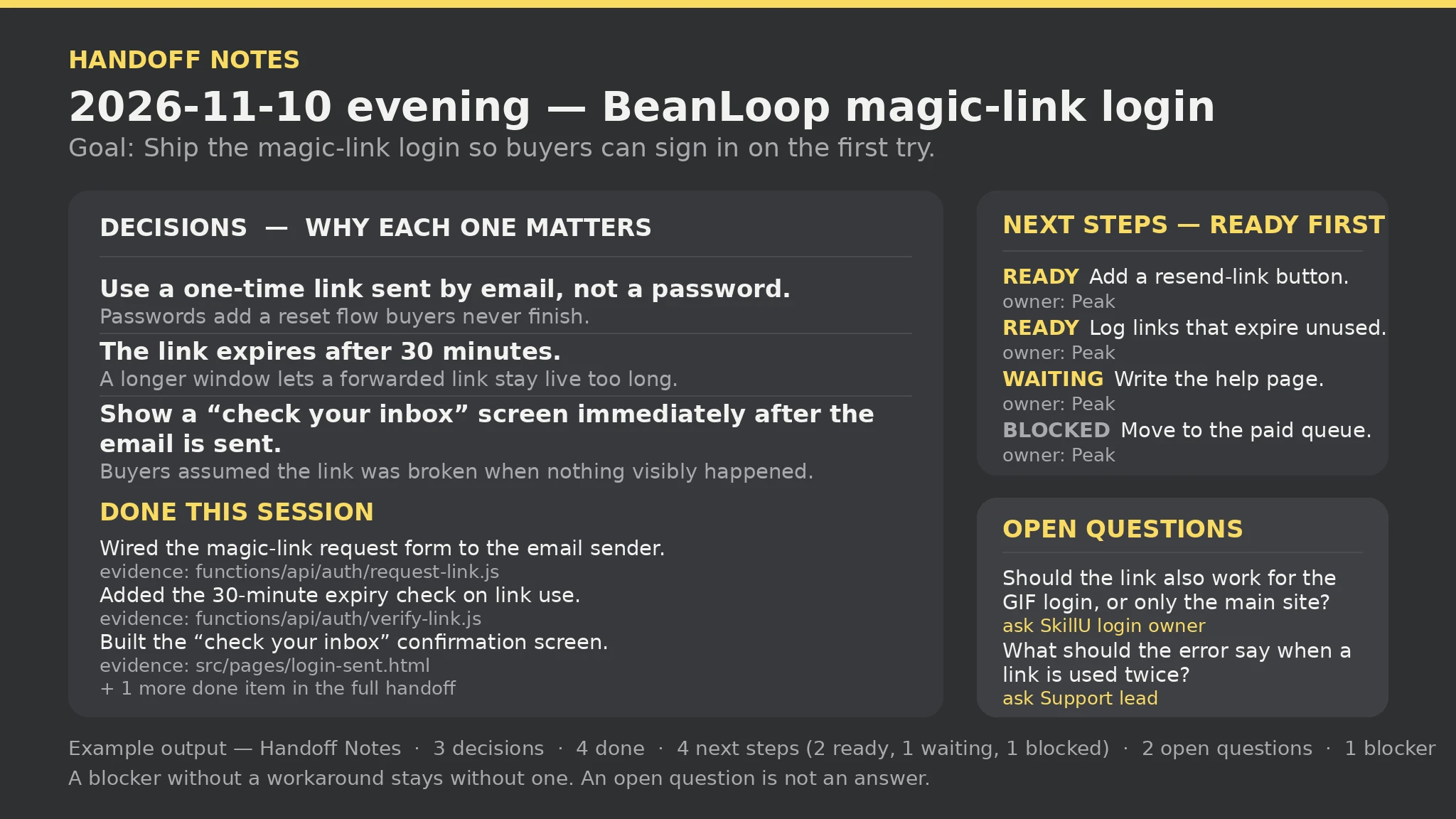
Handoff Notes report — sample

Decisions: 3 | Done: 4 | Next steps: 4 (ready 2 · waiting 1 · blocked 1) | Open questions: 2 | Blockers: 1 | Gaps: 1 | Errors: 0 | Warnings: 0

Decisions: Use a one-time link sent by email, not a password — passwords add a reset flow buyers never finish; the link expires after 30 minutes — a longer window lets a forwarded link stay live too long; show a "check your inbox" screen immediately — buyers assumed the link was broken when nothing visibly happened.

Next steps (ready first, then waiting, then blocked): [ready] Add a resend-link button on the confirmation screen — owner: Peak; [ready] Log how many links expire unused — owner: Peak; [waiting] Write the login help page for buyers who never get the email — owner: Peak; [blocked] Move the email sender behind the paid-worker queue — owner: Peak.

Gaps: 2 open question(s) are unanswered — 'Should the link also work for the GIF generator's login, or only the main site?' (ask SkillU login owner); 'What should the error say when a link is used twice?' (ask Support lead).
이 세션을 다음 세션이 이어서 진행할 수 있는 핸드오프 문서로 만들어 주세요. 결정, 완료한 일, 순서대로 정렬된 다음 단계, 미해결 질문, 차단 요소를 포함해서.Read https://skillu.dev/install/agent.md, then install the Handoff Notes skill (handoff-notes)./handoff-notes. 그리고 원하는 것을 평범한 말로 설명하세요.당신이 쓴 상태만으로 정렬합니다. ready가 먼저, waiting이 다음, blocked가 마지막입니다. 같은 상태 안에서는 쓴 순서를 유지합니다. blocked로 표시된 단계는 숨겨지지도, 앞으로 당겨지지도 않습니다. 목록 끝에 남아 다음 세션이 멈춰 있다는 것을 볼 수 있습니다.
핸드오프에 남아 '아직 우회 방법 없음'으로 나열되며, 누락란에 우회 방법이 없는 차단 요소가 몇 개인지 명시됩니다. 문서는 우회 방법을 절대 지어내지 않습니다. Blocker 행에 우회 방법을 추가하고(차단 요소 | 영향 | 우회 방법) 다시 실행하세요.