 Skill
SkillArchitecture Diagrammer
Turn a plain-text spec of components and connections into a validated SVG architecture diagram — with a written report that drops unknown edges, rejects duplicates, and names orphans and cycles.
Works with: Claude Code, Codex, Cursor, Muse · Version 1.0.0 · Needs: An architecture spec (spec.txt: [components] id: Label | type, [connections] a -> b: label).
Get this Skill with Premium See plans
Preview
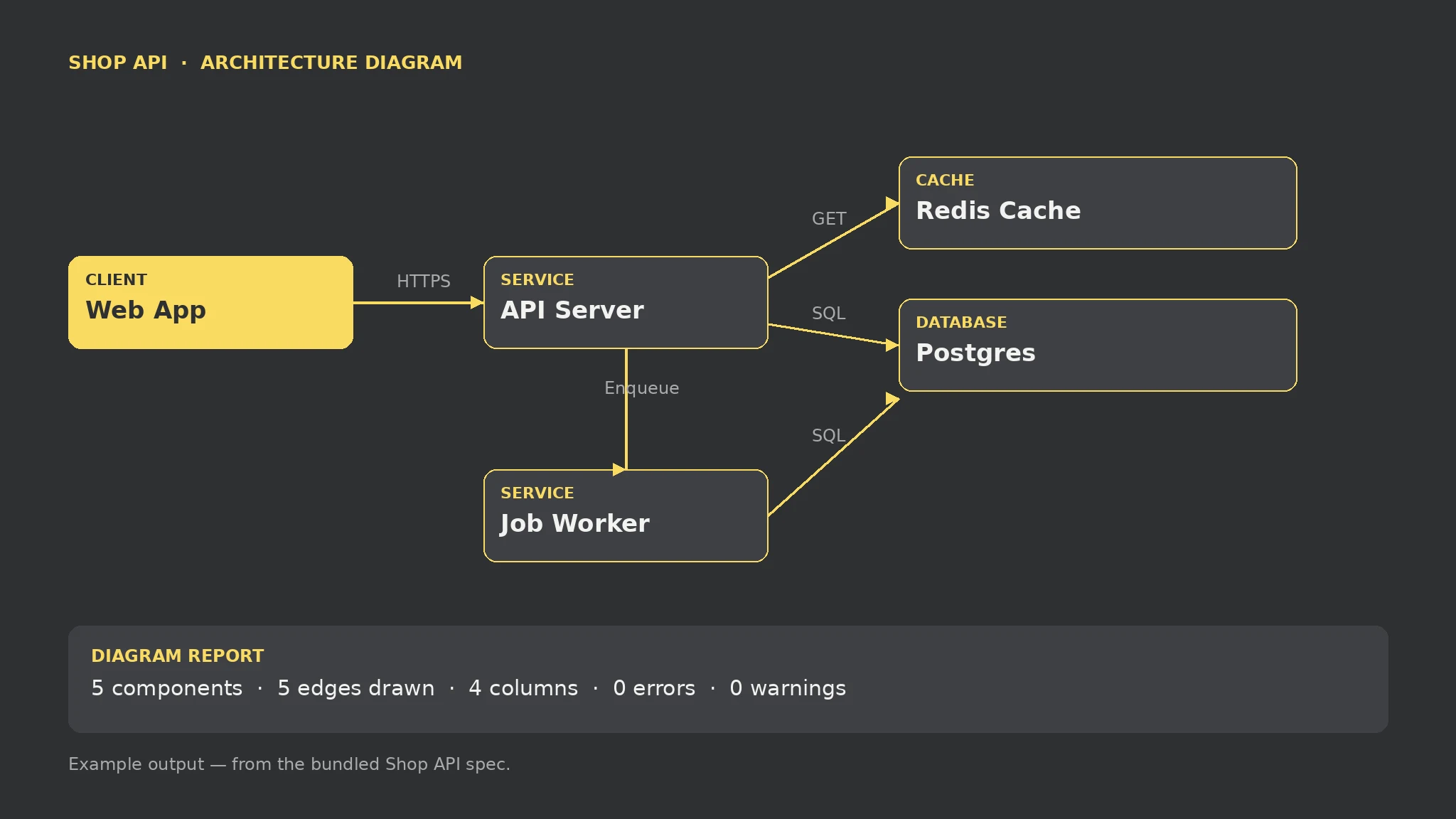
Sample output
An example of what this Skill produces. Sample content, shown for illustration.
Architecture Diagrammer report — sample

Diagram report: Shop API

Components: 5 | Edges drawn: 5 | Columns: 4

Components: Web App (client, column 0); API Server (service, column 1); Redis Cache (cache, column 2); Job Worker (service, column 2); Postgres (database, column 3).

Edges: Web App -> API Server: HTTPS; API Server -> Redis Cache: GET; API Server -> Postgres: SQL; API Server -> Job Worker: Enqueue; Job Worker -> Postgres: SQL.

Errors: none. Warnings: none.

Messy draft check: 5 components, 3 edges drawn, 2 errors (duplicate api id; edge to unknown ghost dropped), 4 warnings (unknown type, 2 orphans, cycle api -> db -> api).
What you get
- A validated SVG diagram: dependency columns, labelled arrows, cycles routed below
- A diagram report: component and edge tables plus every error and warning
- Validation that drops unknown edges and rejects duplicate ids before drawing
- A spec format you can check in next to the diagram it produces
About this Skill
Reads a plain-text spec ([components] with id, label, and type; [connections] with labelled arrows) and renders a dependency-column SVG diagram plus a diagram-report.md: component and edge tables, one column per component, and every error and warning. A connection naming an unknown component is dropped, never drawn to a guessed box; a duplicate id keeps its first definition; orphans and cycles are reported, not hidden. Local-only, standard library only; the diagram shows only what the spec lists — nothing is inferred to complete the picture.
Try it
Draw the architecture diagram for my Shop API from this spec.Good fit
- Documenting a system for a README, doc, or PR review
- Checking a hand-written architecture sketch before sharing it
- Keeping a diagram honest: only what is listed gets drawn
Not for
- Reverse-engineering a diagram from a codebase — the spec is written by you
- Inventing missing components, stores, or connections to complete a picture
- Proving an architecture is correct — a clean report means it matches the spec, not reality
How to install
- Copy the install prompt into your agent:
Read https://skillu.dev/install/agent.md, then install the Architecture Diagrammer skill (architecture-diagrammer). - Or download the Skill package from this page after launch and place its folder in your agent’s skills directory.
- Call it with a slash command, e.g.
/architecture-diagrammer, and describe what you want in plain words.
FAQ
What happens if my spec has an error?
The diagram still renders from the valid parts, and the report lists every error and warning: unknown edges are dropped, duplicate ids keep their first definition, and orphans and cycles are named. Fix the spec and rerun.
Does it draw anything I did not list?
No. Only components and edges from your spec appear. A missing cache or fallback path is a spec gap to fix, not something the skill fills in.