← 全部 Skills · 3D · 3D Product Turntable Brief

3D Product Turntable Brief — 成品輸出
Runs inClaude Code Codex Cursor Muse Dot Grok Bot Cue OpenClaw Hermes
需要:寫成文字的產品:brief.txt(Product 行、可選的 Style 與 Background 行、每個拍攝點一行 Angle 行(寫成「Degrees | height | note」;度數是 0–359 的整數),以及 Light 行(寫成「Name | type | note」))。

Similar Skills

Blender Scene Assistant previewFree

Blender Scene Assistant

  1. 用純文字寫場景簡報
  2. 對簡報執行產生器
  3. 先讀報告,再相信場景
  4. 在 Blender 裡渲染(無頭或視口均可)
Three.js Scene Builder previewFree

Three.js Scene Builder

  1. 用純文字寫場景簡報
  2. 對簡報執行產生器
  3. 先讀報告,再相信場景
  4. 在瀏覽器裡開啟 scene.html 並環繞查看
3D Exploded View Brief previewPremium

3D Exploded View Brief

  1. 在 brief.txt 裡寫 Product 行,每部件一行 Part 行(寫成「Name |…
  2. 加上 Style 與 Camera 行,給每個部件寫一行 Label 行
  3. 跑編譯腳本,讀結論與完整度分數
  4. 先補缺口——填上部件空著的欄位、給沒標註的部件加標註、寫明風格與機位

View all skills →

你將獲得

  • 一個完整度分數——100 起扣:缺 Product 或角度列表扣 25 分、Angle 或 Light 行每空一欄位扣 8 分、缺 Style、Background 或燈光列表各扣 5 分、角度過少或過多扣 5 分、最大間隔超過 90° 扣 5 分,每項扣分都有出處
  • 一份結論——Ready to shoot,或 Needs work 並點名缺口、錯誤與警告
  • 你寫的角度序列原文——每個角度有度數、高度與說明
  • 你寫的燈光原文——每盞燈有類型與說明
  • 覆蓋情況——旋轉用了哪些高度、最大角度間隔與燈光類型
  • 所有缺口、輸入錯誤與警告都在報告中點名

適合對象

  • 把產品整圈旋轉展示——咖啡機、手錶、小家電——每個角度都有說明
  • 讓角度步長保持均勻,而不是每個拍攝點現猜一個
  • 在花掉一次渲染之前,先檢驗簡報是否完整

不適合

  • 生成 3D 渲染——它只整理你寫的簡報;渲染在別處完成
  • 預測成片好不好看——分數是檢查計數,完整的簡報也可能渲染得很糟
  • 替你補上沒寫的東西——沒寫高度的角度會被標出,絕不會被自動配一個

範例輸出

此 Skill 產出的範例。範例內容,僅供說明。

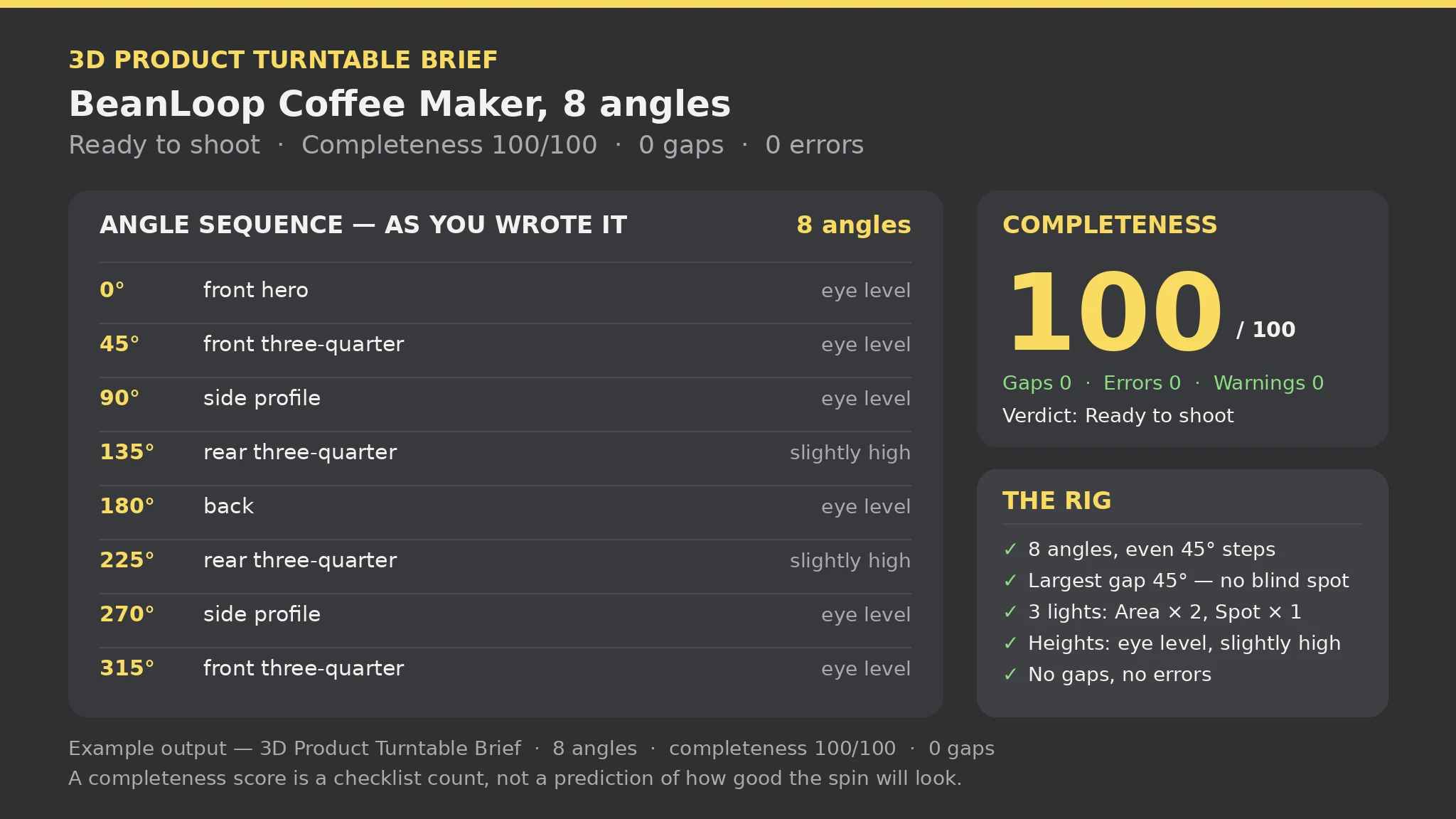
3D Product Turntable Brief — sample

Product: BeanLoop Coffee Maker — countertop espresso machine | Angles: 8 | Lights: 3 | Completeness: 100/100 | Gaps: 0 | Errors: 0 | Warnings: 0

Ready to shoot — the brief is complete.

Angles: 0 degrees (eye level, front hero), 45 degrees (eye level, front three-quarter), 90 degrees (eye level, side profile), 135 degrees (slightly high, rear three-quarter), 180 degrees (eye level, back), 225 degrees (slightly high, rear three-quarter), 270 degrees (eye level, side profile), 315 degrees (eye level, front three-quarter). Even 45-degree steps, largest gap 45 degrees, three lights (Key Area, Fill Area, Rim Spot), and the product, style, and background are named.

A completeness score is a checklist count, not a prediction of how good the spin will look.

關於此 Skill

You say
BeanLoop 有一台咖啡機要整圈旋轉展示——寫出轉盤拍攝簡報,告訴我們它是否可以開拍。

如何安裝

  1. 把安裝提示詞複製到你的 Agent: Read https://skillu.dev/install/agent.md, then install the 3D Product Turntable Brief skill (3d-product-turntable-brief).
  2. 或在上線後從本頁下載 Skill 包,把它的資料夾放入你的 Agent 的 skills 目錄。
  3. 用斜線命令呼叫它,例如 /3d-product-turntable-brief,然後用大白話描述你想要什麼。

常見問題

100/100 分就表示成片一定好看嗎?

不是。它只表示檢查項全部通過:產品、風格與背景齊全;每個角度有度數、高度與說明;燈光齊全;角度步長均勻且無盲區。這是完整度、不是品味——完整的簡報也可能渲染得很糟。

角度可以用哪些度數?

0–359 的整數。其他寫法會被當作錯誤點名、該角度被丟棄,所以 400 這類筆誤絕不會悄悄變成一個拍攝點。

兩個角度之間隔得太大怎麼辦?

最大間隔超過 90° 會扣 5 分——那一段旋轉根本沒拍到。間隔不均只是警告:最大間隔超過最小間隔兩倍以上時,提醒你轉盤轉速忽快忽慢,但整圈仍在覆蓋範圍內。

取得 Premium 瀏覽更多 Skills