


← All skills · Automation · Questionnaire Builder

Questionnaire Builder — finished output
Runs inClaude Code Codex Cursor Muse Dot Grok Bot Cue OpenClaw Hermes
Needs:The questionnaire draft: questionnaire.txt (a Topic line saying what the questionnaire is about, a Purpose line saying what decision its answers will inform, an Audience line saying who answers it, one Section line per group, one Question line per question — the question text, then | Type: scale, choice, multi, open, or yes-no | Section: the group name | Required: yes or no — plus | Options: a; b; c for choice and multi questions — and optional Note lines).

Similar Skills

View all skills →

What you get

  • A grouped questionnaire: sections with typed questions, options, and required markers, in the order you wrote them
  • A Readiness verdict — Ready to send, or Not ready with the gaps and errors named
  • Every question with its type — a choice question without options is dropped and named, never guessed
  • An analysis prompt per section, plus one for the whole questionnaire — prompts, not findings
  • Every gap, input error, and warning named in the report

Good fit

  • Asking a group of people something and wanting the questions organised before sending
  • Making required answers explicit instead of hoping people answer everything
  • Planning what to look for in the answers before the answers come back

Not for

  • Writing the questions for you — every question in the output is one you wrote
  • Deciding what the answers mean — the analysis prompts say what to look for, not what the answers say
  • Sending the questionnaire — the script builds it, you send it

Sample output

An example of what this Skill produces. Sample content, shown for illustration.

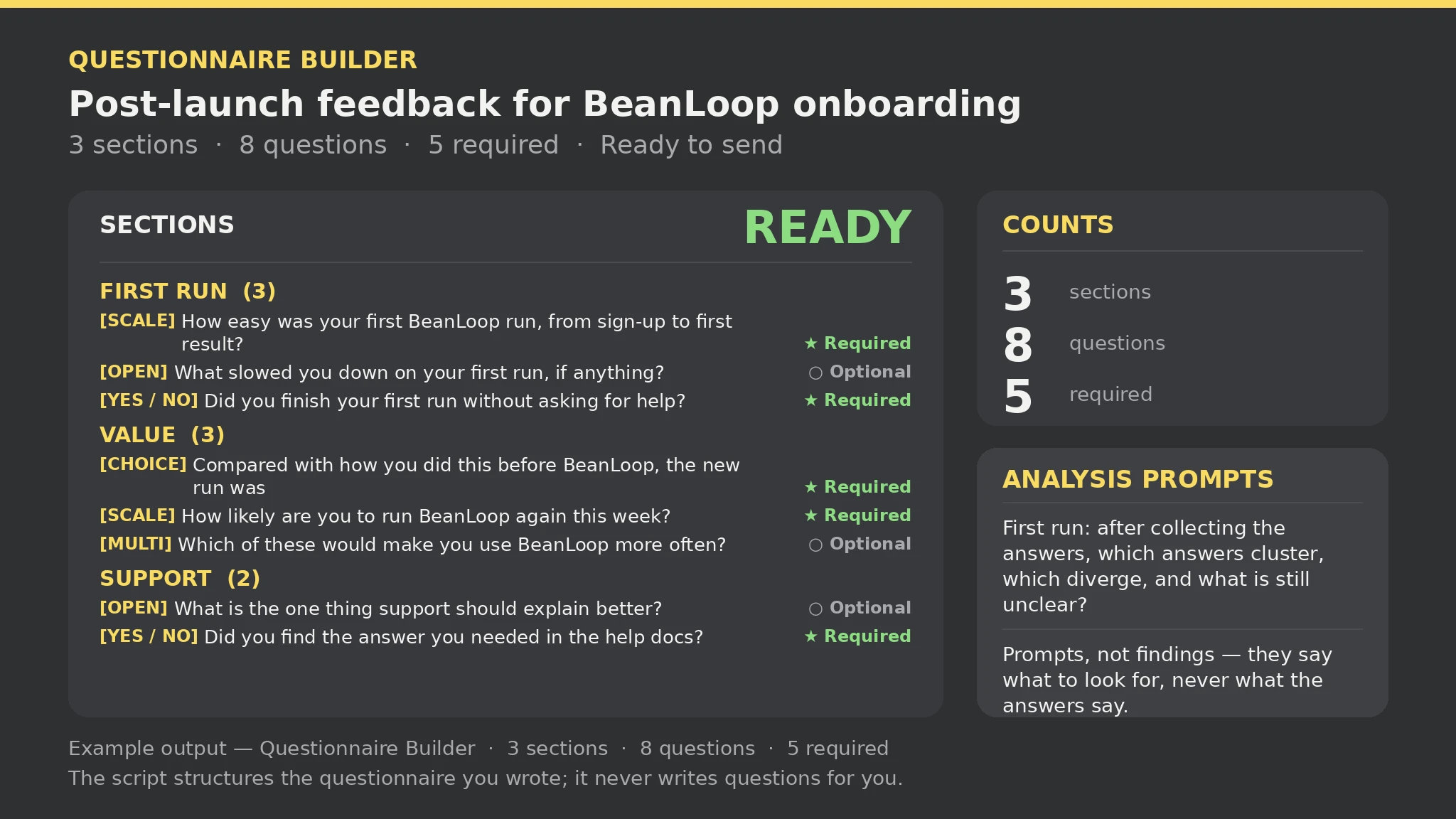
Questionnaire — sample

Sections: 3 | Questions: 8 (scale 2, choice 1, multi 1, open 2, yes-no 2) | Required: 5 | Not stated: 0 | Gaps: 0 | Errors: 0 | Warnings: 0

Ready to send — every part is present and the input had no errors.

First run: 1. [Scale 1-5] How easy was your first BeanLoop run, from sign-up to first result? — ★ Required; 2. [Open text] What slowed you down on your first run, if anything? — ○ Optional; 3. [Yes / No] Did you finish your first run without asking for help? — ★ Required.

Analysis prompts are prompts, not findings — they say what to look for, never what the answers say.

About this Skill

You say
We need post-launch feedback on BeanLoop's new onboarding — build the questionnaire we can send.

How to install

  1. Copy the install prompt into your agent: Read https://skillu.dev/install/agent.md, then install the Questionnaire Builder skill (questionnaire-builder).
  2. Or download the Skill package from this page after launch and place its folder in your agent’s skills directory.
  3. Call it with a slash command, e.g. /questionnaire-builder, and describe what you want in plain words.

FAQ

Does Ready to send mean the questionnaire will get good answers?

No. It means every part is present and the input had no errors — the questionnaire is complete, not the answers. A ready questionnaire can still ask the wrong questions; the analysis prompts are there to help you read what comes back.

What if a choice question has no options?

It is dropped and named in the errors. Options are the question — without them there is nothing to answer. Add the options and run the script again.

Get Premium access Browse more skills