 Skill
 Muse
 Dot
 Cue
 Hermes
 Free
Blender Scene Assistant
- Write the scene brief in plain text
- Run the generator on the brief
- Read the report before trusting the scene
- Render in Blender, headless or in the viewport
← All skills · 3D · 3D Exploded View Brief
Free Free
 Premium
An example of what this Skill produces. Sample content, shown for illustration.
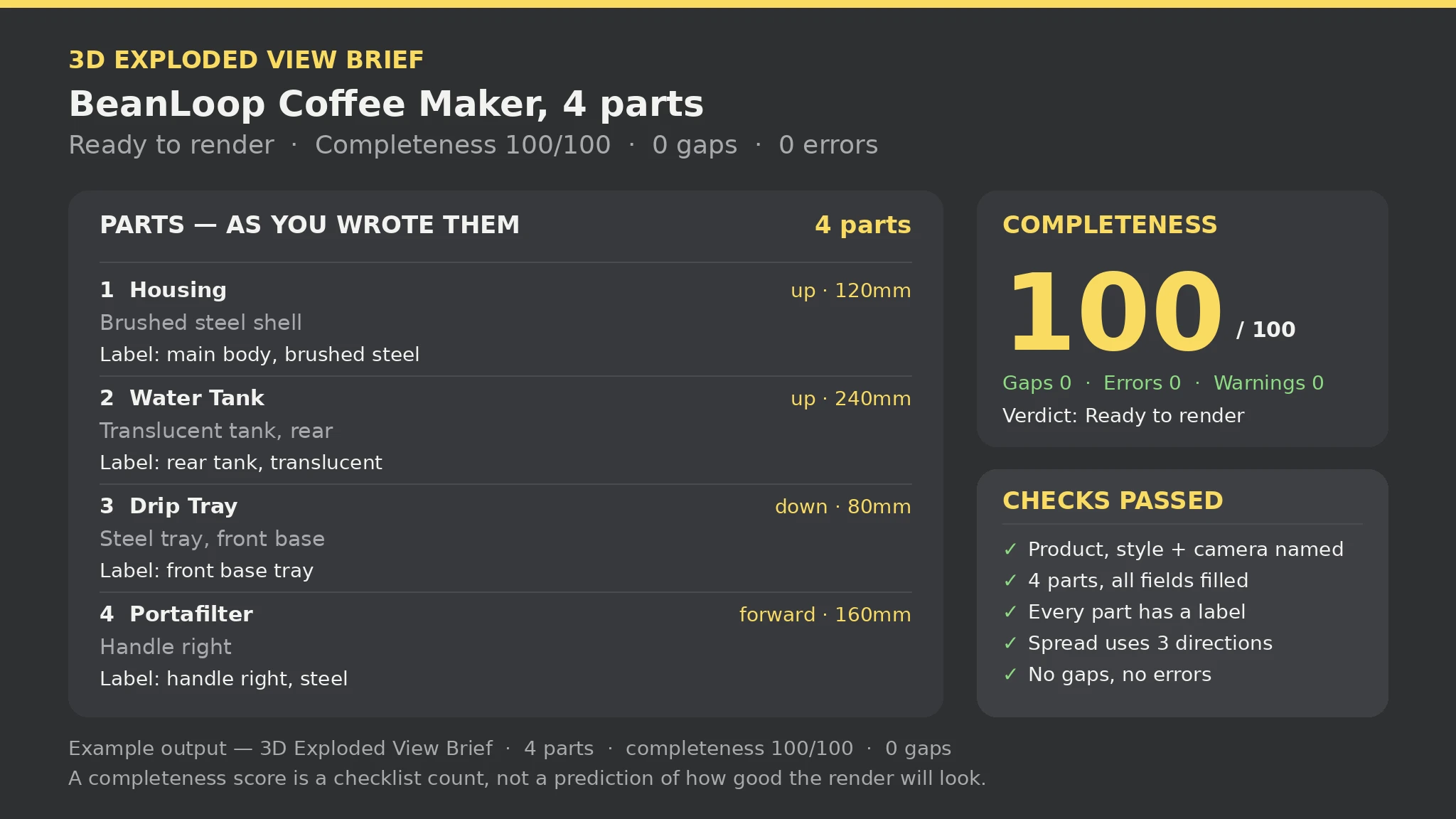
3D Exploded View Brief — sample

Product: BeanLoop Coffee Maker — countertop espresso machine | Parts: 4 | Completeness: 100/100 | Gaps: 0 | Errors: 0 | Warnings: 0

Ready to render — the brief is complete.

Parts: Housing (up, 120mm), Water Tank (up, 240mm), Drip Tray (down, 80mm), Portafilter (forward, 160mm). Every part has a label, the spread uses three directions, and the product, style, and camera are named.

A completeness score is a checklist count, not a prediction of how good the render will look.
BeanLoop has a coffee maker to show taken apart — compile the exploded view and tell us whether it is ready to render.Read https://skillu.dev/install/agent.md, then install the 3D Exploded View Brief skill (3d-exploded-view-brief)./3d-exploded-view-brief, and describe what you want in plain words.No. It means every checklist item passed: a product, a style, and a camera named; every part with a direction, distance, and note; every part with a label; and a spread that uses more than one direction. That is completeness, not taste — a complete brief can still render badly.
Six: up, down, left, right, forward, and back. Anything else is named as an error and the part is dropped, so a typo like sideways never silently becomes a direction.
Two parts sharing the same direction and the same distance are flagged as a warning — they would overlap in the spread. Warnings never change the score or block the verdict; they are a nudge to spread the parts further apart.