← 全部 Skills · 自動化 · Security Audit Lite

Security Audit Lite — 成品輸出
Runs inClaude Code Codex Cursor Muse Dot Grok Bot Cue OpenClaw Hermes
需要:你的稽核筆記:audit.txt(Project 與 Scope 行,每項檢查一行 Check——檢查區 | 主張 | 證據,每個已知風險一行 Risk——檢查區 | 發現 | 嚴重程度:Critical、High、Medium 或 Low | 狀態:open、fixed 或 accepted,以及可選的 Note 行)。檢查區須是 12 個固定區之一:secrets、dependencies、auth、access、data、headers、logging、backups、endpoints、vendors、incidents、updates。

Similar Skills

View all skills →

你將獲得

  • 一張覆蓋表:12 個檢查區各標已覆蓋或未檢查
  • 每項主張附證據,可逐項複核
  • 待處理發現按 Critical、High、Medium、Low 排序
  • 已修復與已接受的風險單獨列出,絕不與待處理混淆
  • 所有缺口、輸入錯誤與警告都在報告中點名

適合對象

  • 上線前快速過一遍安全清單
  • 一眼看清哪些檢查區還沒看過
  • 按嚴重程度逐個處理已知風險,先修 Critical

不適合

  • 證明程式碼沒有漏洞——它不測程式碼
  • 掃描倉庫或自動發現漏洞
  • 給發現定嚴重程度——嚴重程度由你定,腳本只排序

範例輸出

此 Skill 產出的範例。範例內容,僅供說明。

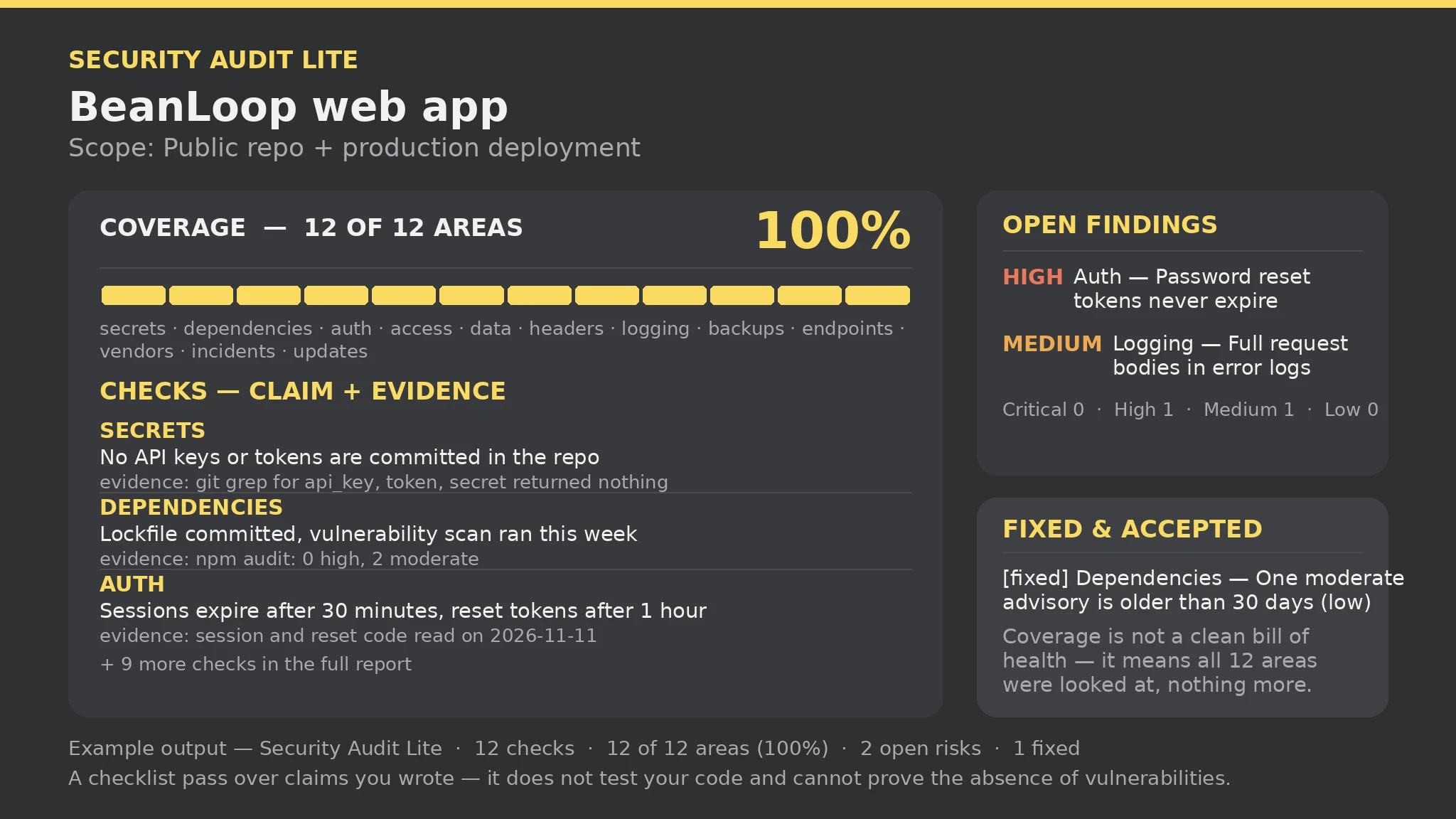
Security Audit Lite report — sample

Checks: 12 | Coverage: 12 of 12 areas (100%) | Open risks: 2 (High 1 · Medium 1) | Fixed: 1 | Gaps: 1 | Errors: 0 | Warnings: 0

Coverage: secrets, dependencies, auth, access, data, headers, logging, backups, endpoints, vendors, incidents, updates — all 12 covered.

Open findings (Critical first): [High] Auth — Password reset tokens never expire; [Medium] Logging — Error logs include full request bodies.

What this report is not: a checklist pass over claims you wrote — it does not test your code and cannot prove the absence of vulnerabilities. Coverage is not a clean bill of health.

關於此 Skill

You say
給這個專案做一次清單式安全稽核——12 個檢查區、已知風險按嚴重程度排序。

如何安裝

  1. 把安裝提示詞複製到你的 Agent: Read https://skillu.dev/install/agent.md, then install the Security Audit Lite skill (security-audit-lite).
  2. 或在上線後從本頁下載 Skill 包,把它的資料夾放入你的 Agent 的 skills 目錄。
  3. 用斜線命令呼叫它,例如 /security-audit-lite,然後用大白話描述你想要什麼。

常見問題

覆蓋率 100% 是不是表示安全?

不是。100% 只表示 12 個檢查區都看過了、一個沒漏;已覆蓋的區裡仍可能有待處理的 Critical 發現。覆蓋率回答的是「有沒有看全」,不是「安不安全」。

沒有證據的主張會怎樣?

會被丟棄並在錯誤裡點名——主張必須附證據(跑過的指令、讀過的檔案或看到的結果)。補上證據再跑一次。

取得 Premium 瀏覽更多 Skills